What you can do from the watch
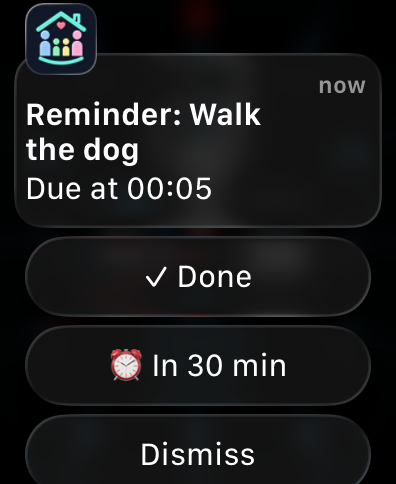
Lanibo's notifications come to your watch like any other app's. Those about a task carry buttons:
| Button | Who sees it | What it does |
|---|---|---|
| ✓ Done | Whoever has to do the task, while it's open | Ticks it off. A parent's task is done at once; a child's waits for a parent's approval, as in the app. |
| ⏰ In 30 min | The same | The same reminder comes again in 30 minutes. |
| ✓ Approve | A parent, when a child's task waits for approval | Approves it — the child gets the points. |
The button works without opening the app; everyone in the family sees the change at once.
Task reminders, "a task for you", a due date that's near — those carry buttons. So do a medicine reminder (💊 Taken), a bill reminder (🧾 Paid) and the morning summary (🛒 Buy…: dictate what to buy — commas for several — and it goes on the first shopping list). Other notifications (shopping, events, the wall) come to the watch too, just without buttons.
Setting it up
There's nothing to set up in Lanibo.
- Apple Watch: notifications from your iPhone's apps reach the watch when the iPhone is locked. In the iPhone's Watch app → Notifications, make sure Lanibo is mirrored. On the watch, the buttons are right under the notification — scroll if they don't all fit.
- Wear OS (Samsung Galaxy Watch, Pixel Watch and others): notifications from the phone show on the watch, buttons included. Check that Lanibo's notifications are on in the watch's companion app on the phone.
Questions
I don't see the buttons. They're only on notifications about a task that's yours and still open (or, for a parent, waiting for approval). On an Apple Watch they're under the text; scroll if the screen is small.
Is there a Lanibo app on the watch? Not yet — for now it's the notifications and their buttons. A watch app with My day is on the list.