> 📱 Works on a child's iPhone with Apple's Family Sharing; Android isn't supported.
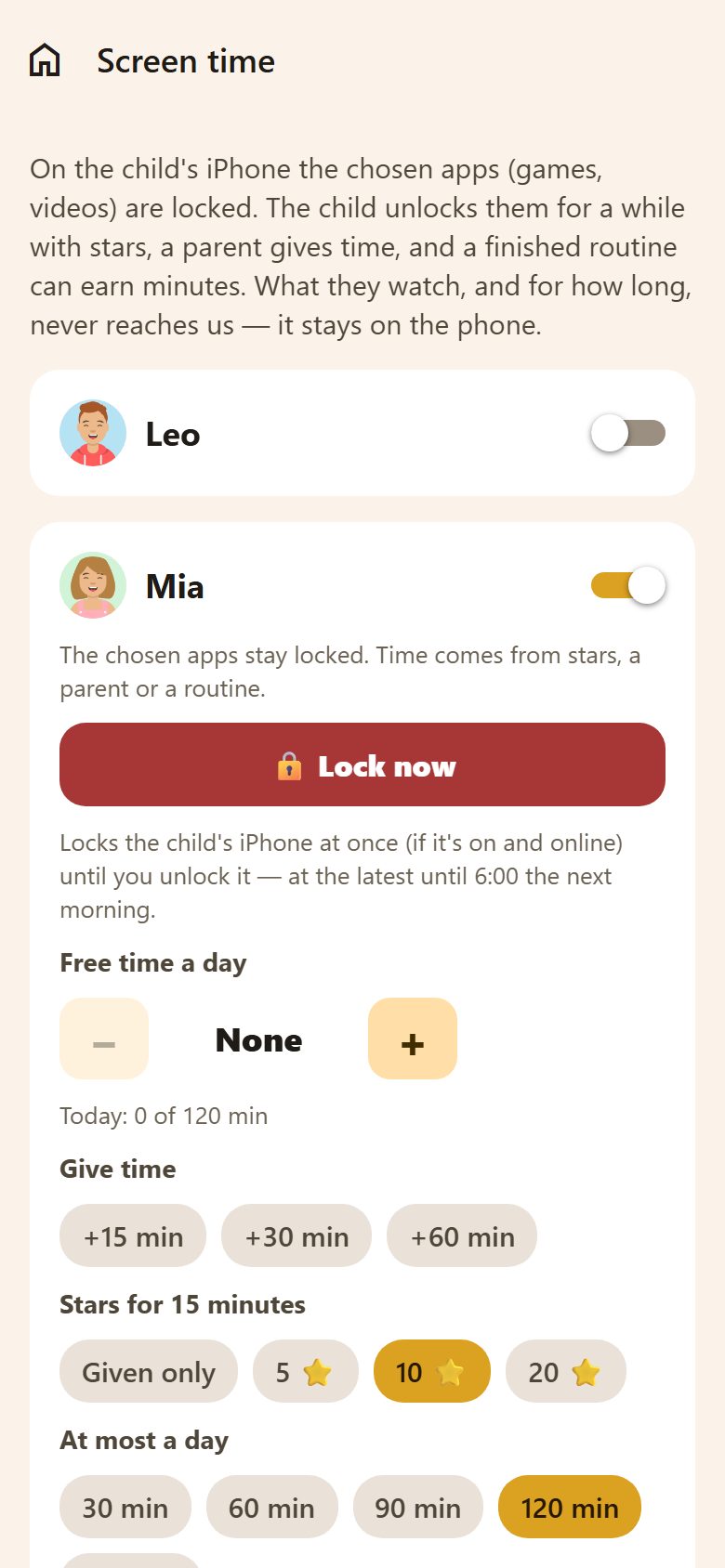
For each child (parents)
Family → Screen time → the child's switch, then:
| Setting | What it does |
|---|---|
| Free time a day | From 6:00 the chosen apps are open for that long a day; then they lock. None keeps them locked. |
| Give time | +15, +30 or +60 minutes now. |
| Stars for 15 minutes | What 15 minutes cost in ⭐ — or Given only (no unlocking with stars). |
| At most a day | The most screen time a day, however it's earned. |
| Minutes for a finished routine | A finished routine earns minutes. |
| 🔒 Lock now | Locks the child's iPhone at once (if it's on and online) until you unlock it — at the latest until 6:00 the next morning. |
How to set up
With a parent next to the child:
- Check Apple's Screen Time for the child as in the table below (on the parent's iPhone).
- On the child's iPhone open Lanibo → Family → Screen time → Set up this phone.
- Approve with the parent's Apple Account — Apple asks for it.
- Choose the locked apps — games, videos, whole categories.
- Confirm with your Lanibo e-mail and password (so only a parent changes it).
- On your phone: Family → Screen time → the child's switch, then the rules above (free time, stars, limits).
- Try it: on the child's iPhone open a locked game — it should say Locked by Lanibo. Give +15 minutes from your phone and it opens.
Apple's Screen Time next to Lanibo
Apple's own Screen Time keeps working next to Lanibo, and the stricter one always wins: Lanibo can't open an app that Apple's Downtime or an App Limit keeps shut. So that only Lanibo decides about games and videos, set the child's Screen Time like this — on the parent's iPhone: Settings → Family → the child → Screen Time:
| Apple setting | Set it to | Why |
|---|---|---|
| Screen Time | On, with a Screen Time passcode the child doesn't know | Without it the child could take Lanibo's access away in Settings. |
| Downtime | Off | Lanibo already locks the chosen apps from 23:59 to 6:00. If you keep a Downtime, it shuts apps even when stars or a parent unlocked them. |
| App Limits | None for the apps Lanibo locks | An App Limit locks the app when it runs out, whatever time was earned in Lanibo. |
| Always Allowed | Add Lanibo (and Phone, Messages) | So the child can always open Lanibo to unlock with stars or ask a parent — also if you keep a Downtime. |
| Content & Privacy Restrictions | As you like (age ratings, purchases, Deleting Apps: Don't Allow) | They don't fight with Lanibo's times; not allowing deletion is an extra lock. |
| Communication Limits, Ask to Buy | As you like | Nothing to do with Lanibo. |
In Lanibo, choose games, videos and social apps — not "All Apps & Categories", so Lanibo, Phone and Messages stay open.
The phone must use a child's Apple Account in your Family Sharing; otherwise Apple doesn't allow it.
What the child sees
A locked app shows Locked by Lanibo — "Finish your tasks and unlock with ⭐ — or ask a parent for time." In Lanibo the child:
- sees whether the games are locked and until when;
- unlocks for a while with their stars ("15 min · 10 ⭐");
- or taps Ask a parent — the parents get a notification.
At a glance
- The child sees 🔓 Unlocked until 17:45 on My day while earned time runs — no need to ask.
- Parents see each child on the Screen time tile in Family and on this screen: 🔓 until when, free time left (about, in 15 minutes) or 🔒 locked, as the child's iPhone last told it, with how long ago. The iPhone tells it when Lanibo is open on it or a parent's change wakes it.
Privacy
What the child watches, and for how long, never reaches us — Apple keeps it on the phone. Lanibo only knows the rules and how many minutes were used today.
Questions
A game stays locked although the child has time. Look at Apple's Screen Time for the child (table above): a Downtime or an App Limit on that app wins over Lanibo.
The child unlocks apps without Lanibo. Set a Screen Time passcode on the child's Screen Time, and don't share it.
Does it work on Android? No — it needs Apple's Screen Time (Family Controls). On Android, children can still trade stars for rewards like "30 minutes of games".
What if the child's phone is off? Lock now needs the phone on and online. Locked apps stay locked offline: the iPhone itself keeps them locked.